

Paragon 26.3 introduces several workflow-focused updates designed to reduce clicks, simplify listing management, and make navigating listing forms more intuitive. Short videos will accompany each feature below for a quick walkthrough of what’s new.
Listing Forms Now Open Fully Expanded
Listing forms now open with all sections expanded by default, whether you’re creating a new listing or editing an existing one. This gives agents a complete view of the listing immediately, making it faster to review details, spot missing information, and make edits without repeatedly opening containers.
The updated behaviour also improves the search experience. After using the search bar, the form automatically restores with all sections expanded so you can continue working without losing your place. Sections can still be manually collapsed or expanded at any time during editing.
Cleaner Filtering for Pending and Expired Listings
Published Listings filters have been streamlined to make searching by status more intuitive.
When selecting either Pending Tracker or Expired Listing under Additional Filters, the standard Status options will now automatically disable to avoid conflicting filter combinations. Agents can only select one of these specialized filters at a time, helping narrow results more accurately and reducing unnecessary clicks.
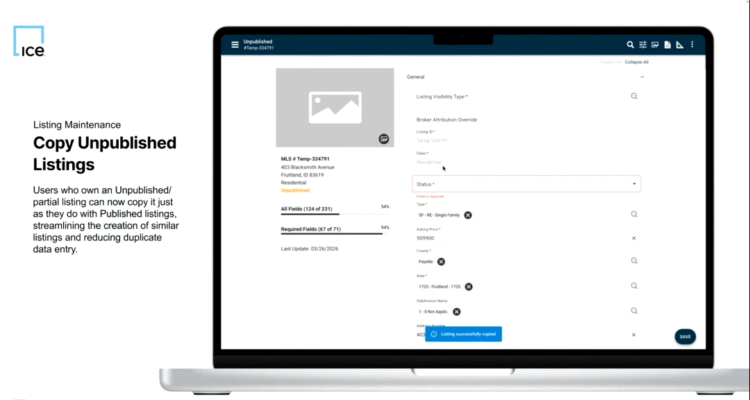
Copy Unpublished Listings
Agents can now copy unpublished and partial listings, making it easier to create similar listings without starting from scratch.
The copied listing opens as a new unpublished listing with a new negative ID while carrying over existing details, including:
- Listing field values
- Photos and labels
- Documents
- Floor plans
- Secondary listing items normally included in published listing copies
All copied content remains intact whether the new listing is saved as unpublished or later published as an active listing.
New Magnify Icon for Search and Listing Modals
Paragon has updated the icon used to open search and listing modals throughout the platform.
Instead of using a caret icon — which is commonly associated with dropdown menus — modal actions now use a magnify icon for clearer navigation and a more consistent user experience. Dropdown menus will continue using carets, helping agents quickly distinguish between expanding a menu and opening a search or selection modal.
Stay tuned for more updates from Paragon 26.3 and 26.4!